Recent Questions
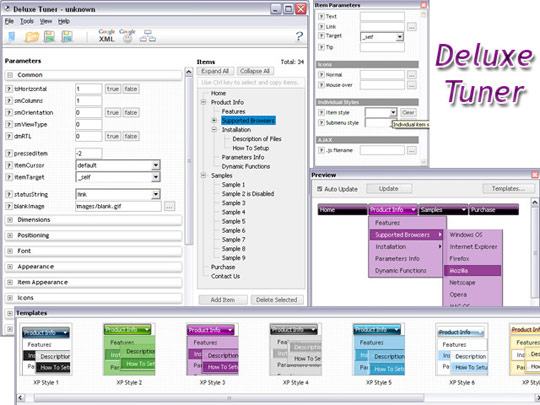
Q: In Delux Tuner I can not find the multi-level or multi-column, it isn't there. Please advise ASAP.
A: Info about multilevel and multicolomn menus you can find here:
http://deluxe-menu.com/multilevel-menu-sample.html
http://deluxe-menu.com/multicolumn-menu-sample.html
If you have any questions, please, write us. We'll try to help you.
Q: I would like with pleasure, that if one clicks on "Seite1", one in the menu dynamique dhtml sees that one is on page 1 therefore color different or icon different.
A: You should set pressed menu dynamique dhtml item. On each page:
<script type="text/javascript">
onload=setPressed;
function setPressed()
{
dtreet_ext_setPressedItem(0,dtreet_ext_getItemIDByIndex (0, 3));
}
</script>
where 3 - is the index of Seite1 item.
Q: .How customizable is it style in for dhtml navigation, meaning, i have images i want used for the top level navigation, and background images for the rest. any way I can achieve this?
A: Actually you can create any menu with Deluxe Menu. You can use Individual Styles tocreate your menu.
For example:
var itemStyles = [
["itemWidth=92px","itemHeight=21px","itemBorderWidth=0","fontStyle=normal 11px Tahoma",
"fontColor=#FFFFFF,#FFFFFF","itemBackImage=data-vista-03.files/btn_magentablack.gif,data-vista-03.files/btn_magenta.gif"],
];
var menuStyles = [
["menuBackColor=transparent","menuBackImage=back.gif","menuBorderWidth=0","itemSpacing=1","itemPadding=0px 5px 0px 5px"],
];
Q: Why when an image is added to the parent javascript layer menu (bar) breaks in two...
I just purchased it today.
A: See images in Vista Templates have the fixed width and height (92 x 21).
If you want to change items' width/height you should change images.
btn_cyan.gif
btn_cyan2.gif
You can do it in any graph editor, for example in Adobe PhotoShop.
You should also change items width in your Individual Item Style.
var itemStyles = [
["itemWidth=92px","itemBorderWidth=0","fontStyle=normal 11px
Tahoma","fontColor=#FFFFFF,#FFFFFF","itemBackImage=btn_cyan.gif,btn_cyan2.gif"],
];
You can do it in Deluxe Tuner.